 Jouli
From signed to installed.
Once a customer signs and you countersign, the job moves to Jobs. That’s where you book the install, give your crew a printable job sheet with no prices on it, keep the site photos and serial numbers, and mark it installed.
Five marks, each on a real day.
A job is drawn from the same design the customer signed, so the crew installs what was sold.
- 01Signed and countersigned
The customer signs, then your owner or back office countersigns. Only then is it a job, in To book.
- 02Book install
Pick the install day: today or one still to come. The job moves to Booked.
Never inside a door-knock sale’s cooling-off - 03Stock delivered
Mark the day it arrived. The stock payment falls due from that day, in Finance, and the mark goes on the job’s timeline.
- 04Mark installed
The day the work was done, never one still to come, with the inverter serial and, on a battery job, the battery serial.
- 05Put on hold
At any point. Book install starts the job again.
An owner or back office can do this on any job, and so can your installers. A rep can on their own jobs, where your company lets reps quote. Cancelling or refunding a job stays with the owner and back office. Where a job is big enough to count as a home building contract in NSW, Queensland, SA, WA or Tasmania, nothing falls due when the stock arrives: after the deposit, the rest is due at completion.
- To book
- Booked
- Installed
Today or a day still to come. On a door-knock sale, never inside the cooling-off period: Jobs shows the day it ends.
- 10 × 440 W panels, numbered on the roof
- 5 kW inverter
- 13.5 kWh battery, and its site plan
- Switchboard
- Meter
- Battery spot
- Roof
On a phone, Add a photo opens the camera. The location a phone stamps on a photo is removed, and your customer never sees them.
They print on the job sheet, and your installers can add them.
- To book
- Booked
- Installed
- Photos, serials and network numbers on file
- The final payment falls due in Finance
- The job sheet shows no price, cost or margin
Is this job ready for someone to attend?
Three stages: To book, Booked and Installed. Search by name, address or job reference.
- A light before the nameOn when something would waste a visit
- The trackTo book, booked, installed, with the day it was signed or its install date
- On filePhotos, the site plan on a battery job, and DNSP once the network’s application number and the meter number are both in
- FlagsNo roof layout, supply phase not set, an extra priced at inspection
- Dates that matterWhen a door-knock sale’s cooling-off ends, and the day the stock arrived
- Cancelled or refundedOff Jobs altogether: it’s under Cancelled in Proposals, and its job sheet says so
One sheet for the crew, with no prices.
Every proposal gets one, from the same design. It’s live until the job is signed, then frozen at the signed version. Download job sheet (PDF), in Jobs, saves it in one click, and it prints on A4.
- Warnings firstNot signed (don’t order stock or book a crew), no roof layout, supply phase not set, a network assessment likely
- The systemSolar, panels, battery, supply, the NMI, the network application and meter numbers, the retailer
- Equipment to load and checkA tick box per item: a water heater as HW1, air conditioners as AC1, AC2 and on, and an OLD row for each one coming out
- A proposed string designWhere it can be worked out, marked Proposed, not certified
- On siteWhat’s there now and whether it stays, and the extras on the job
- The roofThe aerial photo with each panel numbered, positions to confirm on site
- Photos and the site planSite photos two to a row and, on a battery job, the battery site plan
The single-line diagram opens beside it: an installer’s schematic drawn from the same design. Ratings it doesn’t hold print as TBC, and it isn’t the drawing that goes to the network.
Photos, the battery plan and the network’s numbers.
Site photos
Up to 12 a job: switchboard, meter, battery spot, roof or other. On a phone, Add a photo opens the camera. The location a phone stamps on a photo is removed, and your customer never sees them.
Battery site plan
Tap to place the battery, inverter, switchboard and meter, and type the cable run. It can sit on the battery-spot photo. Under it, the installer’s location check prints ready to fill in.
DNSP and meter numbers
Record the network’s application number and the meter number, before or after signing. They print on the sheet, and your installers can add them.
What follows the job.
VEU evidence
A heat pump water heater or air conditioner quoted under Victorian Energy Upgrades has a section on its sheet for your accredited provider: the record, the photos kept as taken, the documents and a checklist of what’s missing. When nothing is, back office downloads the pack in one click. Hot water, heating & cooling
Changes after signing
A signed job is never redrafted. If the inspection changes the design, your owner or back office makes a variation, signed by both sides, which takes the job’s network and meter numbers, photos, site plan and VEU evidence with it. Until it’s signed, the job can’t be marked installed. Proposals & e-sign
Jobs, on the phone in the van.
The Jobs list shows what is signed and waiting to be booked. Screens from Jouli. Brightfield Solar is a demo company: the customers and the addresses are invented.
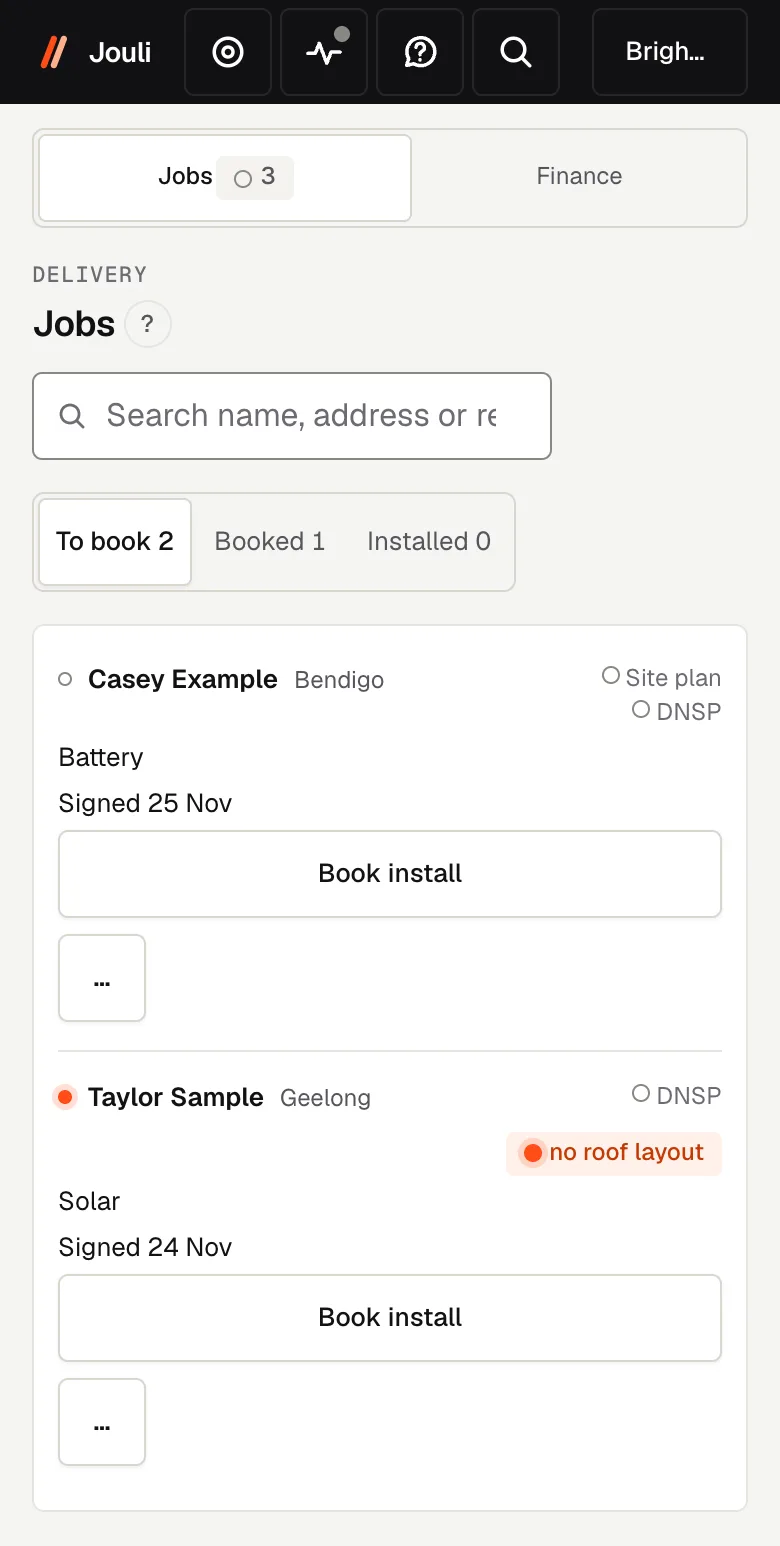
The job, never the price.
Your installers sign in with their own role, Installer / Operations.
- They seeThe Dashboard, Reports and signed jobs only, each with its sheet, photos and diagram
- To call the customerTheir name, phone, email and address, on signed jobs
- They doBook, install and hold jobs, mark stock delivered, add photos, serials and network and meter numbers, keep the VEU evidence
- NeverA lead, a price, a cost, a margin, Finance or Admin. They can’t cancel or refund a job
Jobs, answered.
Can my crew use it on a phone?
Yes. Jobs and the job sheet work on a phone, and Add a photo opens the camera.
Do installers see what the customer paid?
No. Installers never see a price, cost or margin.
Does the customer see the site photos?
No. They stay with the job, with the phone’s location removed.
Is the string design certified?
No. It’s marked Proposed, not certified. Your installer confirms it.
Can I book an install inside the cooling-off period?
Not on a door-knock sale. Jobs shows the day cooling-off ends, and the install can be booked from the day after.
Can a job be marked installed before we countersign?
No. It isn’t a job until your owner or back office countersigns, and nobody can mark it installed before then.
Hand your crew a sheet with no prices.
No card. 5 free proposals once sending is switched on, to use within 30 days.
Guide: the job sheetTeam & rolesFinance & paymentsGuide: Variations and re-quotesGuide: VEU evidence and your accredited provider’s pack