 Jouli
A sales pipeline that runs on your proposals.
Jouli keeps track of every customer you’ve sent a proposal to, and puts the people worth calling today at the top. It comes with every pack, with no add-on and no fee per user.
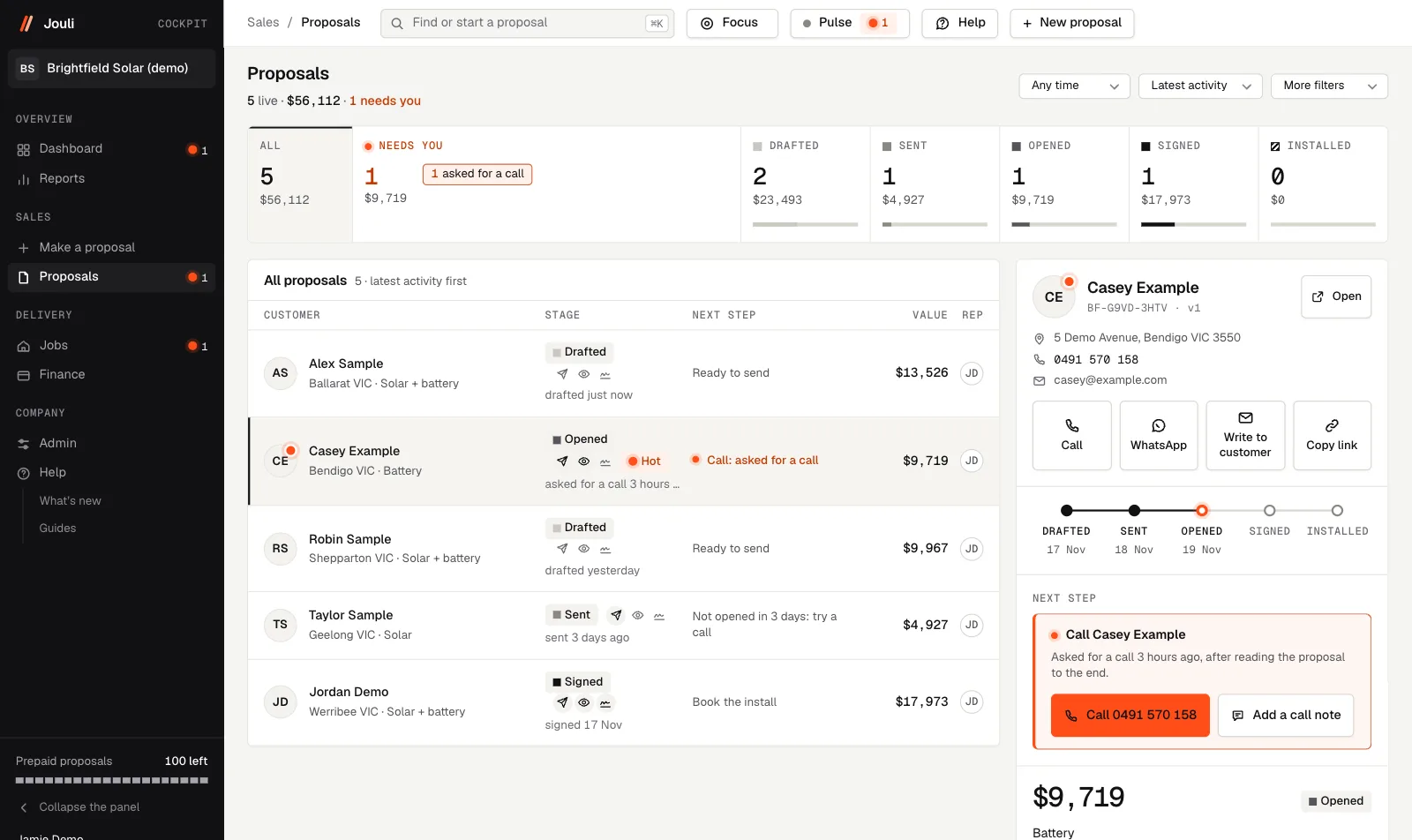
Proposals, from a demo company with made-up customers.
The stage strip
All, Needs you, Drafted, Sent, Opened, Signed and Installed, each with how many and their value. Narrow it to the last 7, 30 or 90 days, or search.
Needs you
A customer waiting, an email that bounced, a signature to countersign, a discount to approve. Each person sees only what they act on.
One next step
Every row says what happens next: send it, call them, countersign it. After a call, a note goes on the timeline.
Something the customer did that says: call now.
Only the customer’s own opens count, and only when they scroll, tap or type. Your own previews never count, and neither do opens from a browser where someone on your team is signed in to the cockpit.
Each signal shows in your consultant’s Pulse panel as it happens. Opens, reads and returns stay in the cockpit by default, so nobody gets an email for every open. A Call me makes the proposal Hot and is emailed too, and your company’s inbox gets it as well.
Who is reading, and who is warm.
Pulse tells your team what customers are doing with their proposals, in the cockpit, without an email for every open. Each person chooses what reaches them, and how.
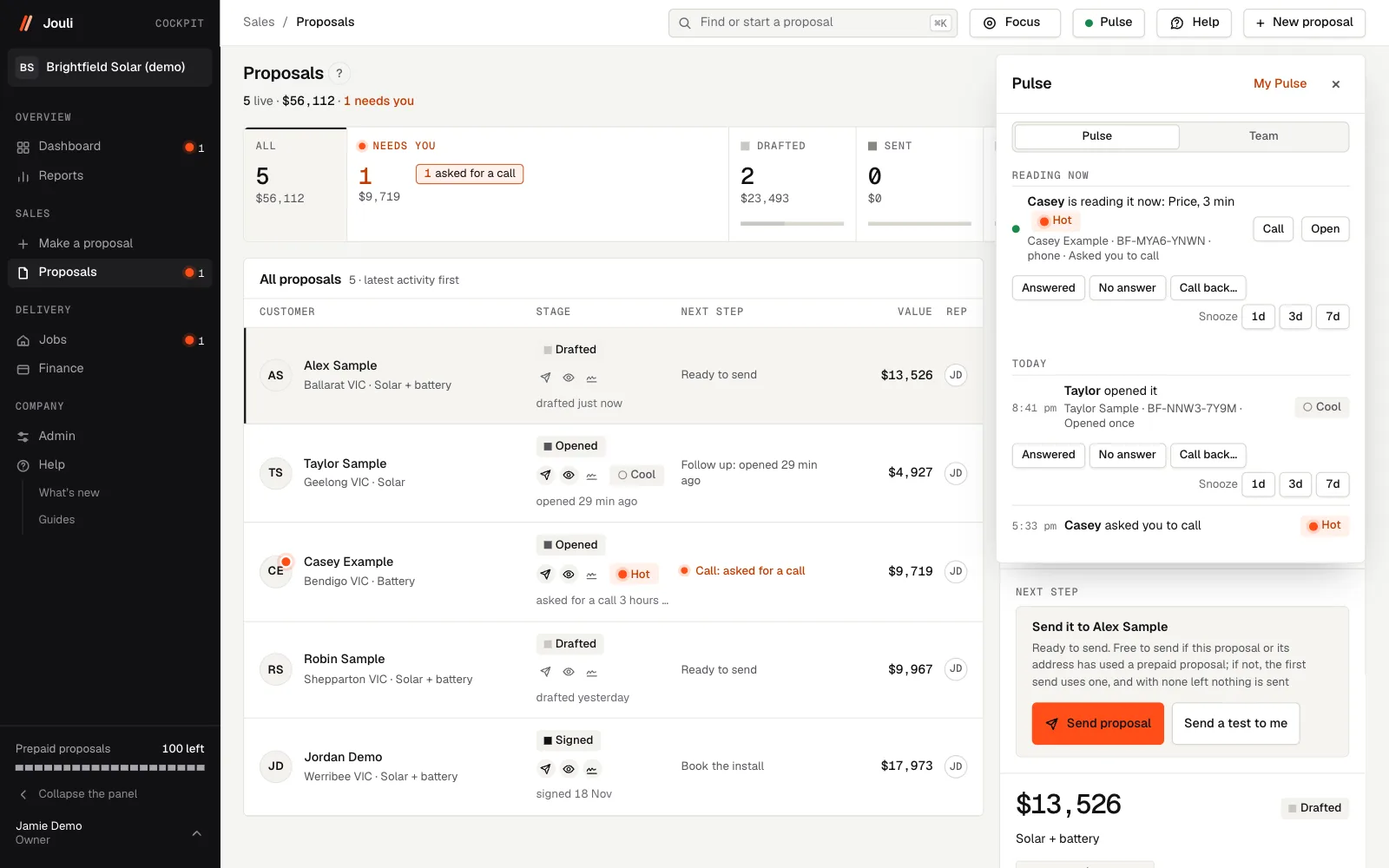
- Reading nowWhile a customer has their proposal open, the Pulse panel says who is reading it and which part, for example the price or the finance, with Call and Open beside it
- Hot, Warm or CoolEvery open proposal gets a warmth, with the reason in plain words: opened 4 times, read the finance twice, a second device. It fades with quiet, and a call note after the signals cools it
- TodayThe day’s signals in one list. Several on one proposal within half an hour read as one line, and each line opens its proposal
- My PulseEach person picks In app or Email for each moment. By default only a signature, a Call me, a no, a bounce and a discount to approve are emailed
- Quiet hours and FocusFrom 7 pm to 7 am by default, only a signature gets through. Focus, for door-knocking, lets only a signature and a Call me through for up to 4 hours
- Log a callOn a Pulse card, one tap says how it went: Answered, No answer, or Call back at a time you pick. A call back becomes a phone alert when it’s due, and a line in your next morning brief
- SnoozeHold a proposal’s reading signals for 1, 3 or 7 days. A signature and a Call me still come through
- Gone quietA proposal that was Hot or Warm and hasn’t been opened for a week is listed on the Dashboard and in the morning brief, with Call and Send a reminder email
- Reading signalsA card can say Looking closely at the price, once the price has been read three separate times, and Usually reads in the evening, from the third time they open it. It’s a part of the day, never a time
- TeamWins this week, with the price shown only to the roles that see it. Stalled proposals for the owner, back office and the read-only manager
See who is reading, while they read.
While a customer has their proposal open, the Pulse panel says who is reading it and which part, for example the price or the finance, with Call and Open beside it.
An example with a made-up customer. Pulse shows this in the cockpit, so your team is not emailed for every open.
From a customer opening it to your call.
Pulse beside the proposals list.
Screens from Jouli. Brightfield Solar is a demo company: the customers and the addresses are invented.
From signal to call.
- 01The customer acts
Opens, reads to the end, comes back, or presses Call me.
- 02Your consultant is told
In their Pulse panel at once. A Call me is emailed too, outside their quiet hours.
- 03Who to call
The Dashboard lists the Hot and Warm proposals, warmest first, and says why.
- 04A call note
Type what was said. It goes on the customer’s timeline.
- 05Off the list
Until the customer does something new.
Each consultant’s morning email opens with Your 3 calls today: their three warmest open proposals, why each is warm, and a way to open the call. It never promises a saving. Below it are proposals opened three or more days ago with no answer, and offers ending within five days. Nothing is sent on a morning with nothing to chase. Each person can turn it off in My Pulse, and an owner can turn these emails off for everyone.
- All21$214k
- Needs you3to call
- Drafted4$41k
- Sent5$52k
- Opened6$63k
- Signed4$39k
- Installed2$19k
- AlexGeelong · read to the end5 days quietCall
- JordanPenrith · opened again today6 days quietCall
- RobinIpswich · on 2 devices3 days quietCall
- SamParramatta · opened8 days quietCall
What did the customer do?
Press a signal to see where that customer lands.
Everything about the job, beside the list.
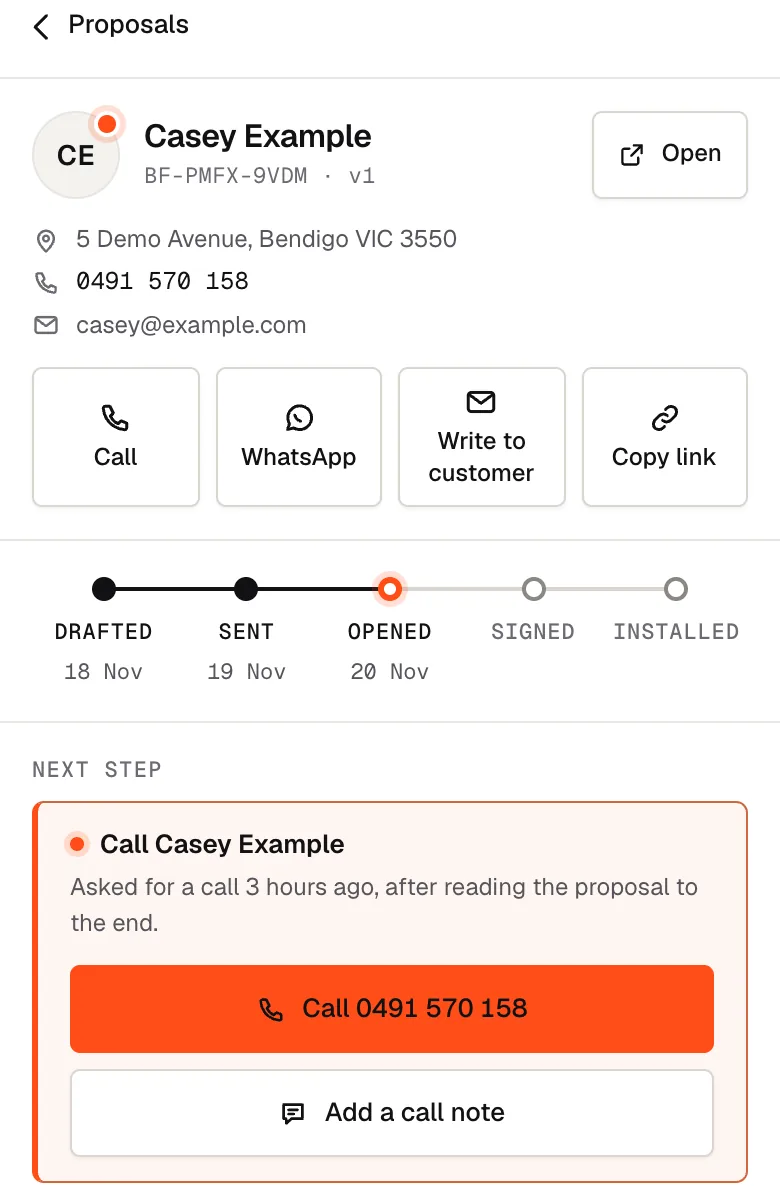
- Reach themCall, WhatsApp, Write to customer and Copy link. Copy link only copies it; on a proposal not yet sent, Mark as sent records the send
- The moneyThe price, the system, when the offer holds to and, on a door-knock sale, when cooling-off ends
- Buying signalsWhat the customer did, and when
- The timelineSent, each open and on what kind of device, read to the end, Call me, signed, variations, call notes and payments
- DetailsThe consultant, who made it, where the customer found you, the reference and version
Two questions, asked once.
Where the customer found you
Make a proposal asks: your website, Facebook or Instagram, Google, a comparison site, a referral, a repeat customer, a door-knock or phone call, or other.
Why a sale was lost
Void asks: price, went with another installer, not ready yet, finance declined, not eligible or the site doesn’t suit, stopped replying, changed their mind, or other.
The week on one page.
Dashboard
Sent, waiting, signed and the signed value with a 12-week line, the pipeline as one bar, Who to call, what’s waiting for you, and signed jobs to book.
Reports
A scoreboard of counts by person, never revenue or margin; the sales report and the funnel from sent to signed; lost reasons and where customers came from.
Who sees what
A rep sees their own jobs, a team lead theirs and their reps’, and the owner, back office and read-only manager everyone’s.
Said plainly.
- No separate lead inboxA customer comes in when you start their proposal from their address
- No calendar or phone systemCall opens your phone; WhatsApp and Email open your own apps
- No add-on, no fee per userThe CRM comes with every pack
The CRM, answered.
Is the CRM an extra cost?
No. It comes with every pack, with no fee per user.
Does opening my own preview count as an open?
No. Only the customer’s opens count, and only when they do something on the page. Nor does a teammate opening the link from a browser where they’re signed in to the cockpit.
Can my reps see each other’s customers?
No. A rep sees their own jobs. A team lead sees their reps’. Owners, back office and the read-only manager see everyone’s.
Can I stop the follow-up emails?
Yes. Each person chooses what is emailed to them in My Pulse, and an owner can turn the follow-up emails off for everyone. A customer’s Call me still reaches your company’s inbox.
Can I bring in leads from my website?
Not today. A customer comes in when you start their proposal.
See who’s ready to sign.
No card. 5 free proposals once sending is switched on, to use within 30 days.